


On Monday, October 26, Apple released iOS 27.2 – along with iPhone Duo and Shortcuts updates, there were a handful of new Siri AI features that improve the experience – recall, more sources, Excluded Apps, granular text selection, and more languages.
MacStories’ Federico Viticci described it as “memory”:


Here’s MacStories’ coverage of the update:
Apple Releases iOS and iPadOS 27.2 with Apple Pencil Support for iPhone Duo and Smarter Siri
From John Voorhees (line breaks added):
One of the limitations of the initial beta release of Siri AI was its lack of access to past conversations. With iOS and iPadOS 27.2, Siri can recall past conversations (English only), which is great, especially if you use Siri a lot.
Siri has added new data sources too, like images attached in the Messages app, voicemail, and Calendar event attendees, along with better browsing history and Reading List results.
Siri AI has also added a centralized setting for excluding apps from its results, along with beta support for French, Japanese, Korean, Portuguese, and Spanish.
Check out the story on MacStories.
I went looking for Apple’s sourcing on these updates and found this page About iOS 27 Updates – here’s the details on Siri AI from iOS 27.2:
iOS 27.2
This update provides enhancements to Siri AI with the ability to retain useful context from previous Siri interactions as well as draw from a wider range of personal context. It also introduces Suggestions in Messages that help you take quick actions in apps like Calendar and Reminders based on context from your conversation. This release includes additional features, bug fixes, and security updates for your iPhone.
Siri AI (All iPhone 16 models and later, iPhone 15 Pro, iPhone 15 Pro Max)
Siri AI can recall your past conversations, so you can ask Siri about something it told you before, like the restaurants it recommended last week
Siri AI can draw from more sources to give you a great answer, including photos attached in Messages, Calendar event attendees, your voicemails, and better results from Safari history and Reading List
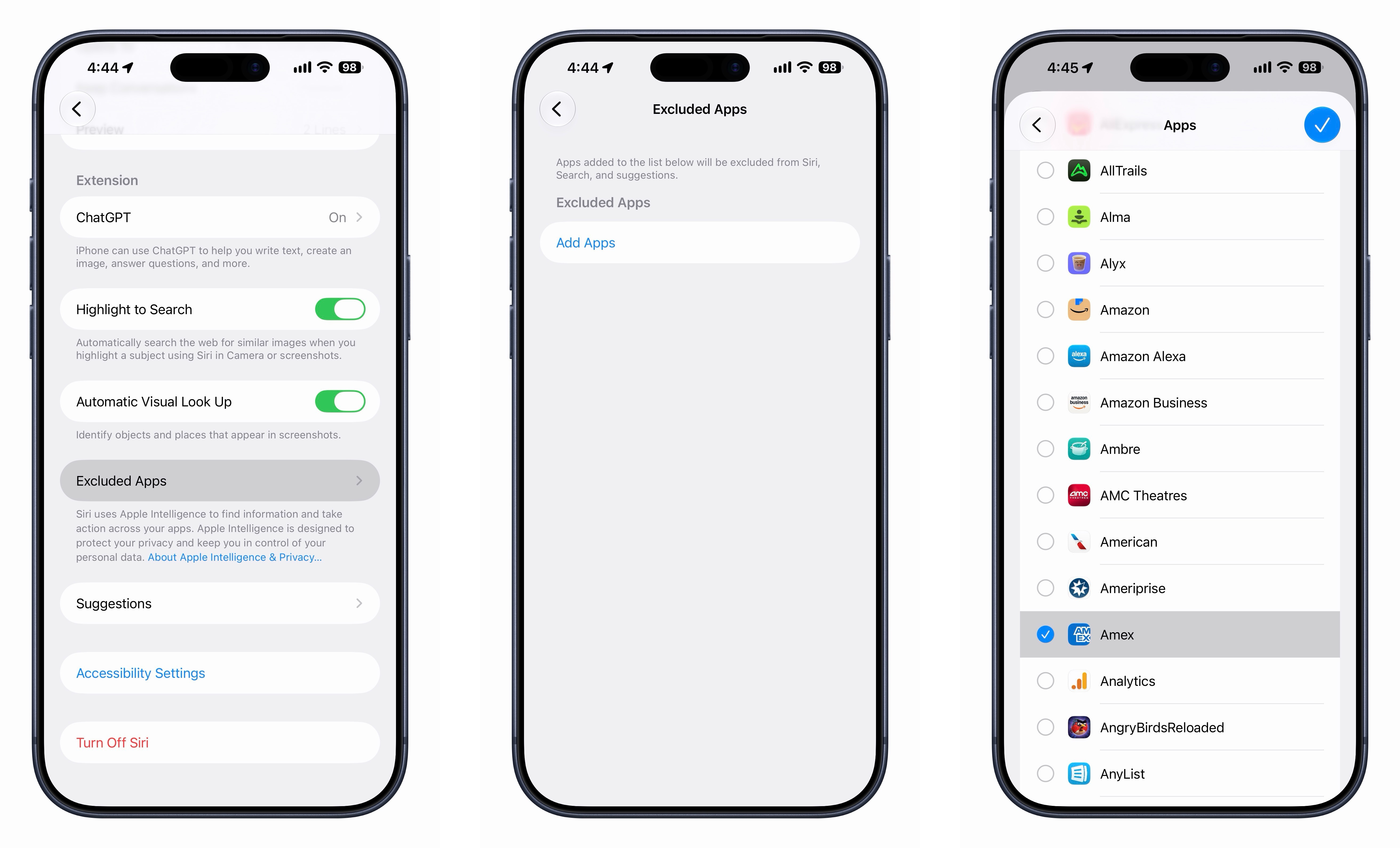
Excluded Apps lets you choose which apps Siri, Search, and suggestions can access, all from one setting
Granular text selection lets you select and copy just the part of a Siri response you need
Siri AI is available in more languages, with support for French, Japanese, Korean, Portuguese, and Spanish. Siri AI is not available in the EU or mainland China
Other
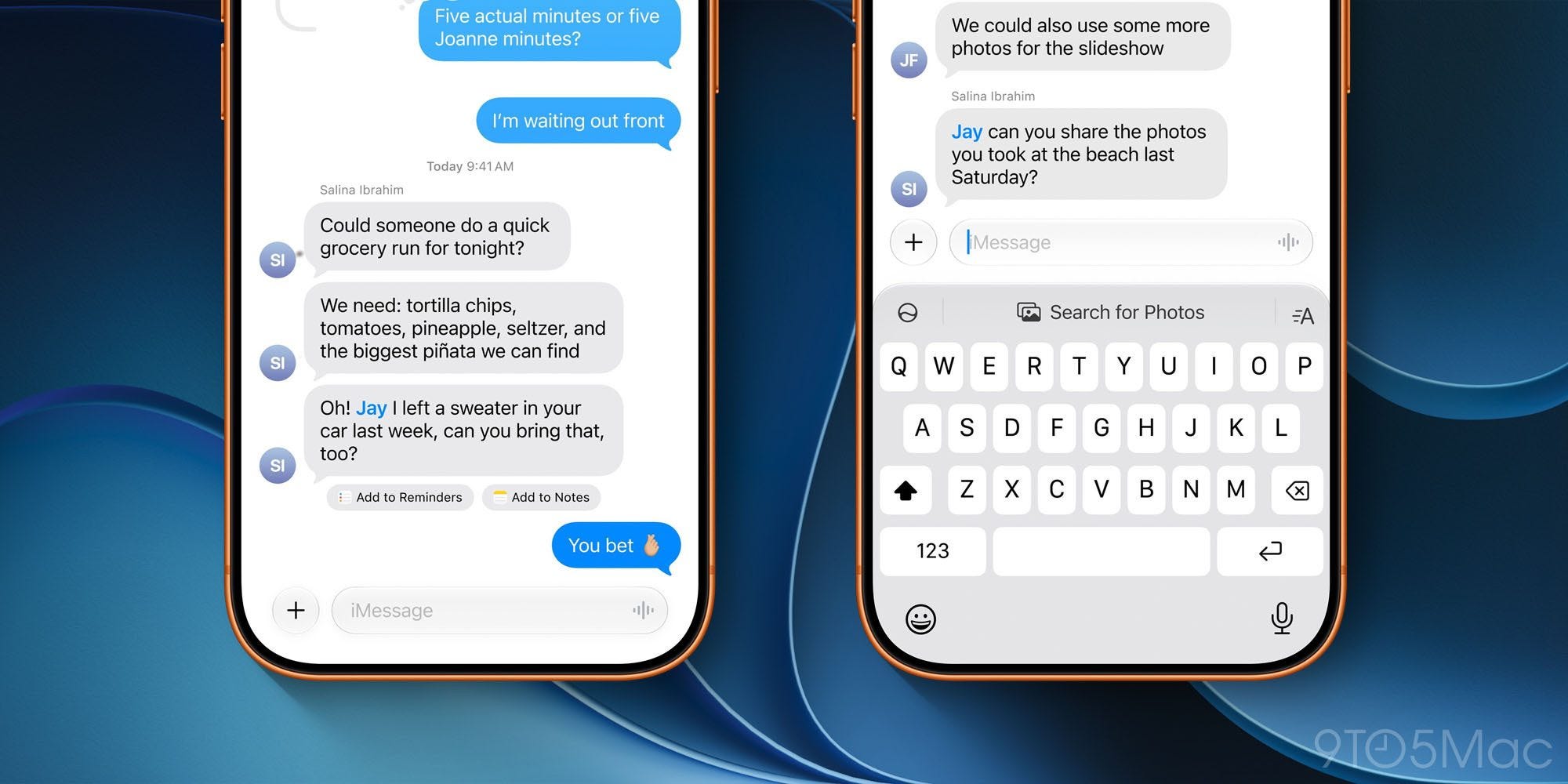
Suggestions in Messages help you take action based on the context of your conversations, like adding a Calendar invite for a dinner
Here’s my breakdown of everything that’s new:
Siri AI
Recall past conversations
Siri AI can recall your past conversations, so you can ask Siri about something it told you before, like the restaurants it recommended last week
As referenced above, Siri now has a “memory” of sorts where previous conversations will add to the total context she can search over time – rather than previously, where Siri AI was unable to pull from past chats and couldn’t remember if you already discussed a topic.
Now, it’s especially useful to follow up in your Siri AI conversations and make any corrections or explain if you took one of her suggestions as a choice – it may inform a future session.
Draw from more sources
Siri AI can draw from more sources to give you a great answer, including photos attached in Messages, Calendar event attendees, your voicemails, and better results from Safari history and Reading List
Apple has expanded more of their App Entity definitions for apps like Messages, Calendar, Phone, and Safari with better Entity Queries that retrieve rich information from non-primary entities.
In plain English, they looked at all the secondary information available in their apps and made that searchable from Siri AI too; their first pass only made the main information available.
Excluded Apps
Excluded Apps lets you choose which apps Siri, Search, and suggestions can access, all from one setting
Available in Settings > Siri > Excluded Apps, Apple has a new feature to fully block multiple apps from Siri experiences at once. While you can still each individual option in each app’s settings, this gives you one place to cut off access fully – here’s what it looks like:
Granular text selection
Granular text selection lets you select and copy just the part of a Siri response you need
While fairly self-explanatory, this addition is useful for choosing a portion of Siri’s response instead of copying the entire block.
More languages
Siri AI is available in more languages, with support for French, Japanese, Korean, Portuguese, and Spanish. Siri AI is not available in the EU or mainland China
Siri AI is now supported for French, Japanese, Korean, Portuguese, and Spanish speakers – just not folks in France or Spain (or China).
Further down, Apple mentions the following for further language disclosures:
Some features may not be available in all regions or on all iPhone models. To learn more, please visit: https://www.apple.com/ios/feature-availability/
Suggestions in Messages
For developers intesreted in adding support for “Suggestions in Messages,” they can check out the documentation on Suggested Actions.
Suggested Actions is a framework that lets developers “offer quick actions next to messages in your messaging app, based on context you provide.” Here’s how Apple describes it:
Overview
When people send each other messages in your messaging app, they share information like dates, reminders, or other actionable content. To let people complete a message-related task in your messaging app with Suggested Actions, add a
SuggestedActionsViewbelow a message and provide the view with message content. To preserve user privacy, the framework analyzes the message content you provide on-device and doesn’t send it to Apple servers.By default, the
SuggestedActionsViewdoesn’t take up space or affect your layout. When you provide it with message content, Suggested Actions identifies the suggested actions that apply to the message, then shows theSuggestedActionsViewinline, filled with actions a person can take. For example, Suggested Actions can detect and suggest actions such as:
Creating an event in Calendar from a proposed meeting time
Adding an entry in Reminders
Opening a location in Maps
Here’s what it looks like, from 9to5Mac’s story “iOS 27.2 adds new Messages feature that’s already a favorite”:
Neat!
Plus, if you want to prevent something from showing up here, just add it to Excluded Apps…
That’s all for this issue!
If you’re enjoying What’s New in Apple Intelligence, please share with someone who might enjoy it too: